 CampSavvy
 Help › Tanks & Propane
Tracking Your Tanks
Black, gray and fresh water levels, and dump reminders.
Free — in the free app
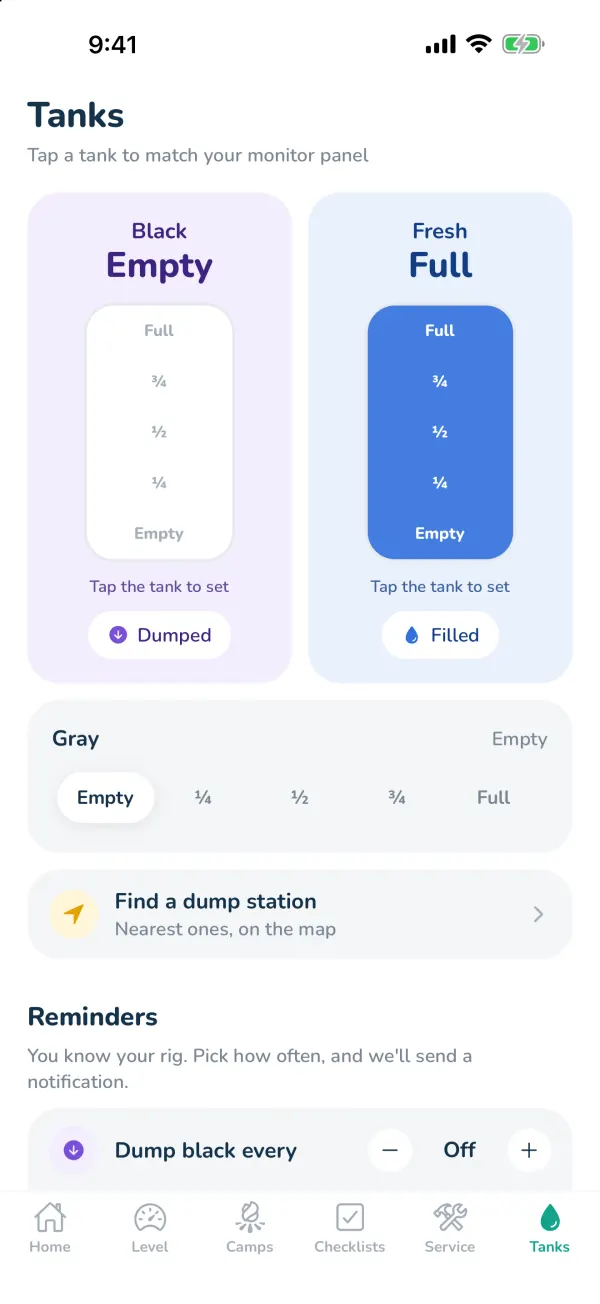
RV tank sensors aren't connected to phones, so CampSavvy doesn't guess. You set the level from your monitor panel in one tap — and set reminders based on how long you usually go.
Setting levels
- Black and Fresh — tap the level on the big tank: Empty, ¼, ½, ¾ or Full.
- Gray — tap the level in the row below.
- Holding tanks turn red at ¾ and up; fresh turns red at ¼ and below.
Dumped and Filled
Tap Dumped after you dump — black and gray go to Empty and the date is saved. Tap Filled after filling fresh water. The tanks show how long ago that was.
Reminders (Pro)
You know your rig — maybe the black tank needs dumping every 4 days. Under Reminders, set Dump black every, Check fresh every and Dump gray every with the + and − buttons (up to 30 days). You'll get a notification that many days after your last dump or fill. Each Dumped or Filled starts the count over.
Find a dump station (Pro)
Tap Find a dump station for the nearest ones on the map. See Dump Stations & Propane Near You.
Still stuck? Email [email protected] and tell us your phone model and what you were trying to do.