 CampSavvy
 Help › Maintenance
Rig Specs & Your VIN
Your engine and generator's oil, filters and capacities.
Free — in the free app
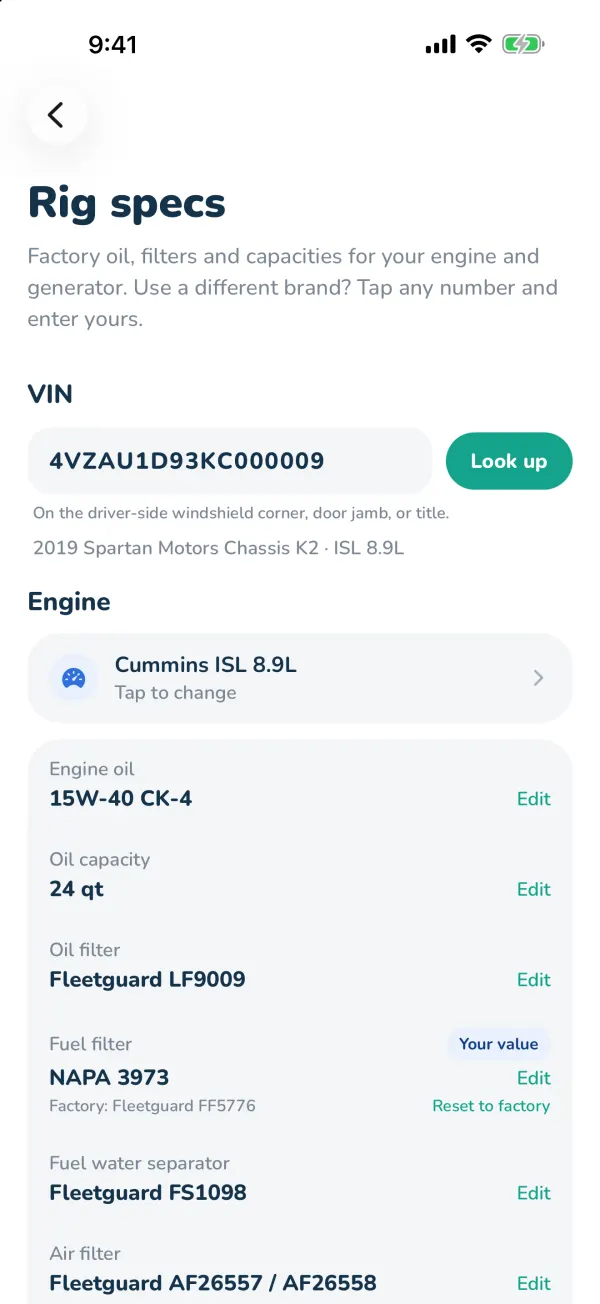
Rig specs shows your engine and generator's factory oil, filters and capacities — and lets you keep your own part numbers when you use a different brand.
Look up your VIN
- Go to Settings → Rig specs, or the Rig specs card on the Service tab.
- Type your 17-character VIN and tap Look up. On a motorhome it's on the driver-side windshield corner, door jamb or title; on a trailer, the frame tongue, title or registration.
- CampSavvy finds your year, make, model and engine. If it can't match the engine, pick it from the list.
You can also pick the engine and generator yourself — tap them and search, like "ISB" or "Onan 5500". Mine isn't listed lets you enter your own.
Oil, filters and capacities (Pro)
With Pro you see engine oil and capacity, oil, fuel and air filters, fuel water separator, air dryer filter, coolant and the oil change interval — and the generator's oil, filters and spark plug.
Your own numbers
Use NAPA or WIX filters, or a different oil? Tap Edit on any line and enter yours. It's marked Your value, with the factory number shown underneath; Reset to factory puts it back.
Factory specs are a starting point. Always confirm with your owner's manual or your repair shop before servicing.
Still stuck? Email [email protected] and tell us your phone model and what you were trying to do.