 CampSavvy
 Help › Maintenance
The Service Log
Keep photos, receipts, costs and notes for every job.
★ Pro — part of CampSavvy Pro
The service log (Pro) keeps a record of every job — what was done, when, the mileage, the cost, notes and photos of receipts or the work. It backs up with your account, photos included, and goes into your service history report.
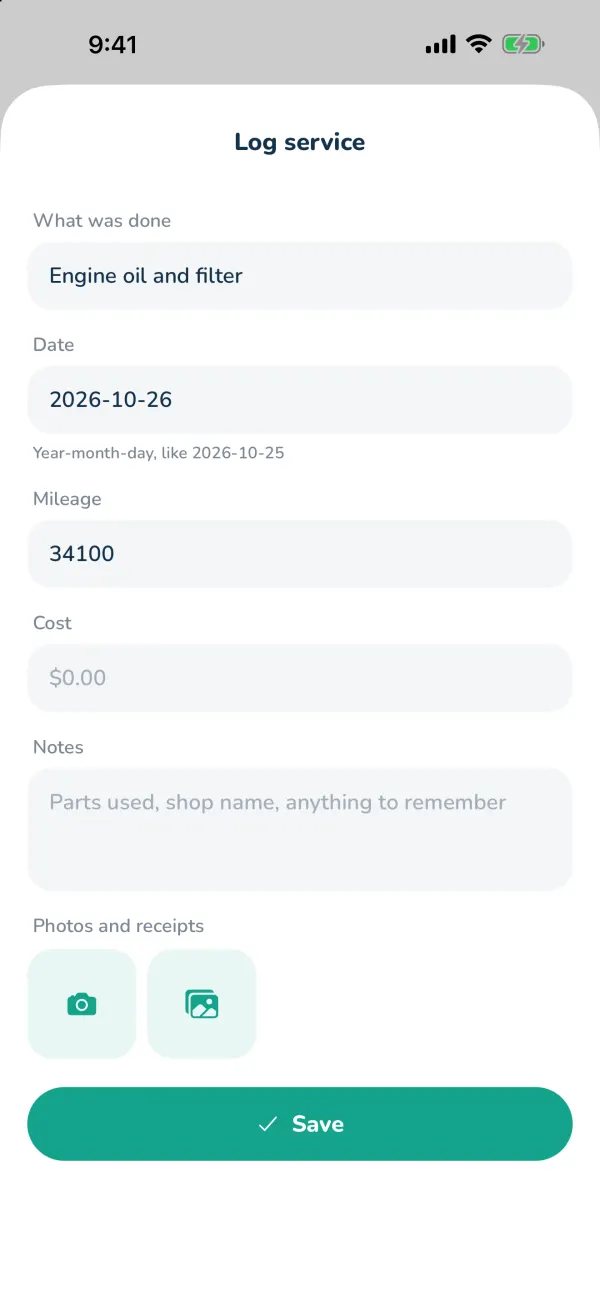
Add an entry
- On a maintenance item, tap Log with photos and cost, or tap Log a service or repair under Service log on the Service tab.
- Fill in What was done, the Date, Mileage, Cost and any Notes (parts used, the shop, anything to remember).
- Add Photos and receipts — take one or pick from your library.
- Tap Save. If it's for a schedule item, that item is marked done on that date.
The Service tab shows your entries newest first with the total spent. Tap one to edit it or Delete entry.
Still stuck? Email [email protected] and tell us your phone model and what you were trying to do.